
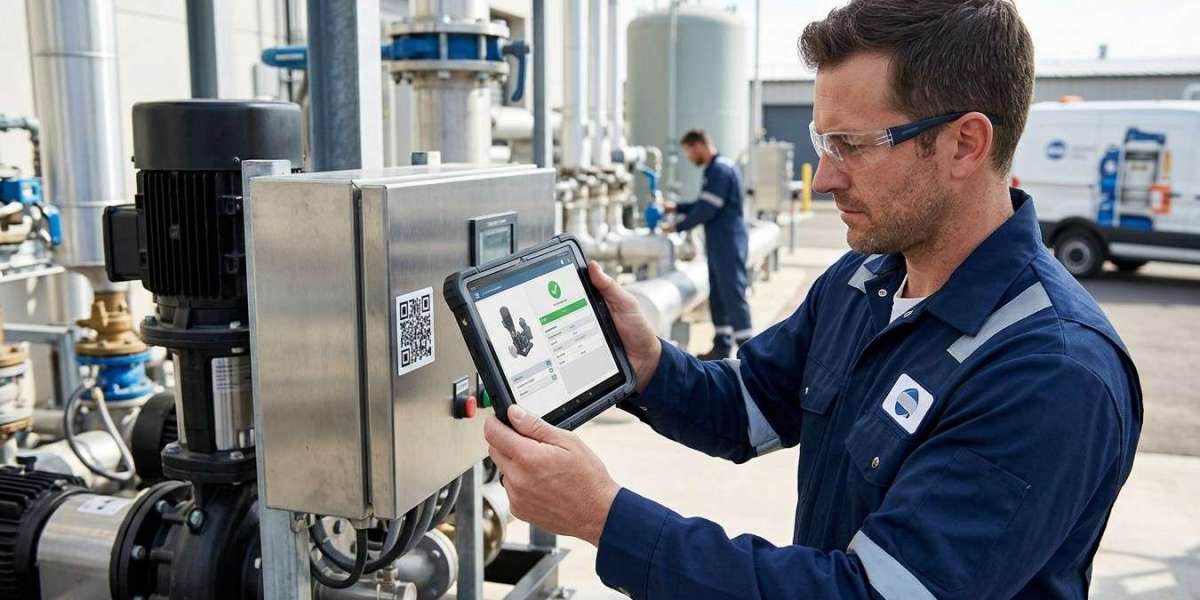
Field service operations are becoming increasingly complex as businesses manage technicians, equipment, spare parts, customer requests, maintenance schedules, and service records across multiple locations. Field technicians often need accurate information while working away from the office, and delays in recording data can affect productivity and customer satisfaction. Mobile barcode scanning provides a practical way to connect field activities with business systems in real time. Pointus Solutions helps businesses explore modern Auto-ID technologies that can improve asset tracking, inventory control, maintenance, and field service workflows. Businesses can also Shop Barcode scanners and mobile devices while selecting suitable Printing Products for creating clear and durable barcode labels.
Mobile barcode scanning combines barcode technology with smartphones, tablets, mobile computers, or dedicated handheld devices. Instead of manually entering equipment numbers, parts information, or service details, technicians can scan a barcode and immediately retrieve or record information. This simple process can transform how field service teams manage daily operations.
What Is Mobile Barcode Scanning?
Mobile barcode scanning allows employees to use a portable device equipped with a barcode scanner or scanning camera to identify products, assets, equipment, parts, and other items.
A technician can scan a barcode attached to a machine, vehicle, component, tool, or spare part. The mobile application can then retrieve relevant information from a connected business system.
Depending on the solution, technicians may be able to access:
- Asset identification details
- Equipment history
- Maintenance records
- Warranty information
- Spare-part availability
- Service schedules
- Customer information
- Previous service reports
- Work orders
- Replacement part information
After completing a task, the technician can update the relevant information directly from the field.
Why Field Service Operations Need Better Data Management
Field service teams frequently work in environments where information changes quickly. A technician may visit several customers in one day, replace multiple components, inspect equipment, and record maintenance activities.
Traditional paper-based processes can create several challenges. Information may need to be written down manually and entered into the central system later. This creates opportunities for errors, delays, lost documents, and incomplete records.
Mobile barcode scanning helps address these challenges by allowing field technicians to capture information at the point of activity.
This can improve:
- Data accuracy
- Technician productivity
- Asset visibility
- Inventory management
- Service documentation
- Customer communication
- Maintenance tracking
1. Faster Asset Identification
One of the biggest advantages of mobile barcode scanning is faster asset identification.
Technicians may work with hundreds or thousands of pieces of equipment. Manually entering serial numbers or asset IDs can take time and may lead to typing mistakes.
With mobile scanning, the technician simply scans the barcode attached to the equipment. The system can immediately identify the asset and display its relevant information.
This is especially useful during:
- Equipment inspections
- Preventive maintenance
- Repairs
- Installation
- Audits
- Warranty service
- Asset verification
Faster identification means technicians can spend more time performing service work and less time searching for information.
2. Improving Work Order Management
Work orders are central to many field service operations.
A work order may contain information about the customer, equipment, service requirements, assigned technician, required parts, and maintenance history.
Mobile barcode scanning can connect the physical asset with its digital work order.
For example, a technician arrives at a customer's facility and scans the equipment barcode. The mobile application can retrieve the corresponding work order and provide information about the required service.
After completing the work, the technician can update the status directly from the mobile device.
This creates a more streamlined process from service request to completion.
3. Reducing Manual Data Entry
Manual data entry is one of the biggest sources of operational errors.
Technicians may have to enter asset numbers, product codes, serial numbers, or spare-part information into a mobile application. Even a small typing mistake can associate the wrong information with an asset.
Barcode scanning reduces this risk by capturing the identifier directly from the physical label.
The technician can scan the item instead of typing its code, making data collection faster and more consistent.
4. Better Spare Parts Management
Field technicians often carry spare parts or need to collect components from warehouses and service centers.
Poor parts management can cause delays. A technician may arrive at a customer location without the correct component, resulting in another visit.
Mobile barcode scanning can improve spare-parts visibility.
Technicians can scan parts when they:
- Receive them.
- Load them into a service vehicle.
- Use them during a repair.
- Return unused parts.
- Transfer them to another technician.
The business system can use these transactions to maintain a clearer record of spare-part movements.
5. Improving Inventory Accuracy in Service Vehicles
Service vehicles can function as small mobile warehouses.
Technicians may carry tools, replacement parts, consumables, and equipment. Keeping accurate records of this inventory can be challenging when items are constantly being added and removed.
Mobile barcode scanning allows technicians to scan inventory during loading, usage, replenishment, and returns.
This helps organizations understand:
- What each technician has
- Which parts have been used
- Which items need replenishment
- What has been returned
- Which parts are available for upcoming jobs
Better visibility can reduce unnecessary purchases and prevent technicians from running out of important components.
6. Real-Time Service Updates
Mobile barcode scanning can help field teams update service information while they are still at the job site.
Instead of writing notes and updating the office later, technicians can record information directly through a mobile application.
Depending on the system, they may record:
- Service completion
- Parts used
- Equipment condition
- Maintenance activities
- Inspection results
- Customer confirmation
- Follow-up requirements
This allows office staff and managers to receive information faster.
7. Supporting Preventive Maintenance
Preventive maintenance is important for reducing equipment downtime and extending asset life.
Mobile barcode scanning can make scheduled maintenance easier to manage.
When a technician scans an asset, the system can display its maintenance history and upcoming service requirements. The technician can then perform the required inspection or maintenance and record the results.
Over time, these records create a detailed history for each asset.
This information can help businesses identify recurring problems and make better maintenance decisions.
8. Improving Asset Tracking
Field service organizations often manage expensive equipment that moves between customers, technicians, warehouses, and service centers.
Without effective tracking, assets can become misplaced or incorrectly recorded.
Barcode labels provide each asset with a unique identifier. Technicians can scan the asset whenever it changes location or status.
For example, an organization can record when equipment is:
- Assigned to a technician
- Delivered to a customer
- Sent for repair
- Returned to a warehouse
- Transferred to another location
- Removed from service
This creates greater visibility throughout the asset lifecycle.
9. Faster Customer Service
Customers expect field service providers to resolve problems quickly.
Mobile barcode scanning can help technicians access the information they need without repeatedly contacting the office.
When an asset is scanned, the technician may be able to view previous service information, equipment specifications, parts history, and other relevant details.
This can help technicians diagnose problems faster and make informed decisions.
Faster service can improve customer satisfaction and reduce unnecessary repeat visits.
10. Supporting Remote and Offline Work
Field technicians do not always work in locations with reliable internet connectivity.
A well-designed mobile field service application can support offline data collection, allowing technicians to scan assets and record information even when connectivity is temporarily unavailable.
When connectivity is restored, the application can synchronize information with the central system.
This is particularly useful for technicians working in remote facilities, construction sites, industrial locations, or areas with limited connectivity.
11. Barcode Printing for Field Service Applications
Barcode scanning is only effective when labels are readable and durable.
Field service assets may be exposed to outdoor conditions, dust, moisture, heat, chemicals, vibration, and frequent handling. Standard paper labels may not always be suitable.
Businesses should select appropriate Printing Products based on the environment and expected label lifespan.
Important considerations include:
- Label material
- Adhesive strength
- Print quality
- Barcode size
- Environmental resistance
- Thermal transfer requirements
- Scanner compatibility
Thermal transfer printing can be useful for applications where long-lasting and durable labels are required.
Companies can Shop Barcode printers, scanners, labels, and accessories according to their specific field service requirements.
12. Choosing the Right Mobile Barcode Device
Not every mobile device is suitable for demanding field service environments.
Businesses should consider:
Scanning Performance
The device should be able to quickly and accurately scan the barcode types used by the organization.
Durability
Field devices may be exposed to drops, dust, moisture, and temperature changes.
Battery Life
Technicians need devices that can operate throughout their working shifts.
Connectivity
Wi-Fi, cellular, Bluetooth, and other connectivity options may be important depending on the environment.
Ergonomics
The device should be comfortable for technicians who scan items frequently.
Software Compatibility
The device should work with the organization's field service, ERP, inventory, or asset management applications.
13. Integrating Mobile Scanning With Business Systems
Mobile barcode scanning provides the most value when it is integrated with existing business systems.
Possible integrations include:
- Field Service Management systems
- ERP platforms
- Warehouse Management Systems
- Inventory software
- Asset management platforms
- CRM systems
- Maintenance management systems
Integration allows information captured in the field to become part of the organization's central database.
This reduces duplicate work and provides managers with a more complete view of field operations.
Best Practices for Mobile Barcode Scanning
Businesses can improve their results by following a few practical best practices:
- Assign unique barcode identifiers to assets and equipment.
- Use durable labels appropriate for the operating environment.
- Standardize barcode formats across the organization.
- Train technicians on proper scanning procedures.
- Keep mobile applications updated.
- Synchronize field data regularly.
- Integrate scanning with inventory and asset systems.
- Review scanning errors and identify recurring problems.
- Maintain mobile devices and barcode equipment.
- Establish clear procedures for lost or damaged labels.
How Pointus Solutions Can Support Field Service Operations
Implementing mobile barcode scanning requires more than purchasing a scanner. Businesses need to consider devices, barcode printers, labels, software, connectivity, integration, and workflow design.
Pointus Solutions can help businesses evaluate Auto-ID and mobile technologies according to their field service requirements. A properly designed solution can connect technicians with inventory, asset, maintenance, and customer information while reducing manual processes.
Organizations can Shop Barcode solutions for scanning and identification and select suitable Printing Products for creating reliable labels for equipment, parts, tools, and other field assets.
Conclusion
Mobile barcode scanning can transform field service operations by making asset identification, inventory tracking, work order management, maintenance recording, and service documentation faster and more accurate.
Instead of relying on handwritten records or manual data entry, technicians can scan an asset and immediately connect the physical item to its digital information. This improves visibility for both field employees and office teams while helping businesses reduce errors and unnecessary administrative work.
For organizations looking to modernize field service operations, Pointus Solutions can provide guidance on suitable Auto-ID and mobile solutions. Businesses can Shop Barcode scanners, mobile devices, printers, and accessories while choosing reliable Printing Products to create durable labels that remain readable in demanding environments.
When mobile scanning is properly integrated with field service, inventory, asset management, and business software, it becomes more than a simple identification tool. It becomes an important part of a connected field service operation that helps technicians work more efficiently, improves data accuracy, and supports better customer service.